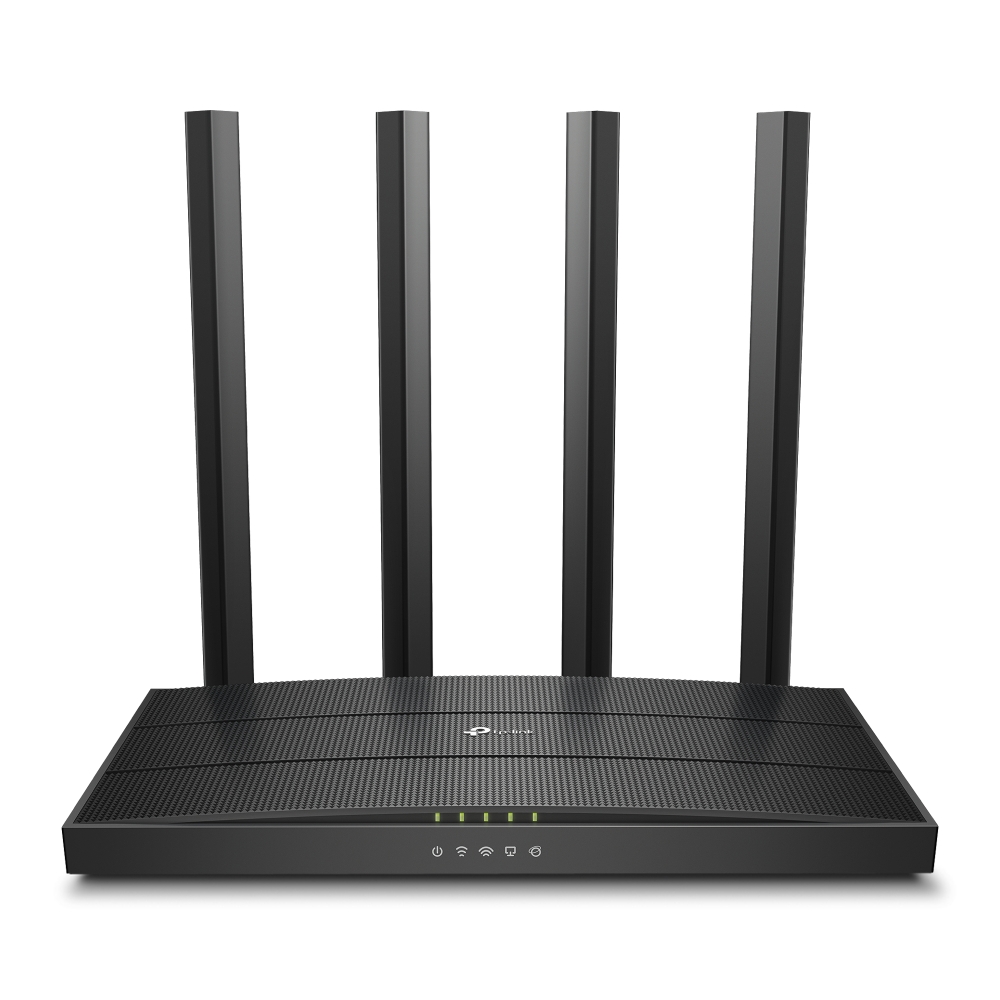
About Archer C6 AC1200 Wireless MU-MIMO Gigabit Router
- AC1200 Dual-Band Wi-Fi 867 Mbps at 5 GHz and 300 Mbps at 2.4 GHz band.
- MU-MIMO Technology Simultaneously transfers data to multiple devices for 2 faster performance.
- Boosted Coverage Four external antennas equipped with Beamforming technology extend and concentrate the Wi-Fi signals.
- Access Point Mode Supports AP Mode to transform your wired connection into the wireless network.
- EasyMesh-Compatible - Flexibly creates a Mesh network by connecting to an EasyMesh-compatible router for seamless whole-home coverage.
- VPN Support - Safely reach files in your local NAS, wherever you are.
- Easy Setup Set up your Wi-Fi in minutes with TP-Link Tether app.
Seamless Dual-Band Wi-Fi PerformanceBenefit from robust wireless speeds up to 867 Mbps on 5GHz and 300 Mbps on 2.4GHz for seamless HD streaming, quick downloads, and lag-free gaming. The Archer C6's MU-MIMO technology ensures multiple devices can access the network simultaneously without compromising performance, making it ideal for busy households or small offices.
Flexible Installation and Modern DesignDesigned to blend into any setting, the Archer C6 can be placed on a desktop or mounted on a wall. Its compact 230 x 144 x 35 mm dimensions and lightweight build make it easy to install, while four fixed external antennas offer extended Wi-Fi coverage to corners of your space.
Simple Network Management and Enhanced SecurityEffortlessly manage your network from anywhere using the Web UI or TP-Link Tether app. The router offers advanced security with WPA-PSK/WPA2-PSK encryption, plus features like parental controls and guest networks to ensure safe, customizable access for family and visitors.
FAQ's of Archer C6 AC1200 Wireless MU-MIMO Gigabit Router:
Q: How do I set up the Archer C6 AC1200 router for the first time?
A: You can set up the Archer C6 by connecting it to your modem via the WAN port, powering it on, and following the on-screen instructions in the Web UI or by using the Tether app, which provides a guided setup process for both wired and wireless connections.
Q: What is the benefit of having MU-MIMO and beamforming technologies in this router?
A: MU-MIMO allows the router to communicate with multiple devices at once, improving efficiency and speed for simultaneous activities, while beamforming helps direct the Wi-Fi signal to specific devices, enhancing coverage and reducing dead zones.
Q: Where can the Archer C6 router be mounted?
A: The Archer C6 supports both desktop and wall-mounting options, offering flexibility to suit your space and ensuring optimal wireless coverage wherever it is installed.
Q: What security features does the Archer C6 provide for my network?
A: This router uses WPA-PSK/WPA2-PSK encryption to safeguard your network against unauthorized access and supports additional features like parental controls and a guest network for secure, flexible usage.
Q: How can I manage the Archer C6 remotely?
A: You can remotely monitor and manage your router and network settings using the TP-Link Tether app, available for both iOS and Android, or access its Web UI from any connected device.
Q: What types of connections are supported by the Archer C6?
A: The Archer C6 offers both wireless (2.4GHz & 5GHz) and wired connections through 1 Gigabit WAN port and 4 Gigabit LAN ports, making it suitable for high-speed internet across various devices.
 Send Inquiry



 Send Inquiry


 Send Inquiry
 English
 Spanish
 French
 German
 Italian
 Chinese (Simplified)
 Japanese
 Korean
 Arabic
 Portuguese